Chord Progression Generator: Build and Hear Chord Ideas
Choose a key, major or minor mode, and a musical character to generate a playable chord progression. The tool shows chord names beside Roman numerals, keeps every suggestion inside the selected key, and lets you hear the loop before you use it.
Build a chord progression
Start with a reliable pattern or generate a controlled variation in the same key.
How to use the chord progression generator
- Choose a key. You do not have to write in C major. Pick a key that suits the singer’s range or feels comfortable on your instrument.
- Select major or minor. This changes the available diatonic chord family; it is more useful than treating the choice as a simple happy-versus-sad switch.
- Choose a character. Pop creates a balanced loop, classical cadence gives a firmer resolution, ballad moves more gently, and cinematic uses broader colour changes.
- Generate and listen. Read the chord symbols and Roman numerals together. Copy a useful result, or use controlled random for another option that remains in key.
This generator is a starting point, not an automatic songwriting machine. It removes the first blank-page decision and gives you harmony you can test by ear. Melody, rhythm, bass movement, voicing and arrangement are still creative choices you control.
Why show Roman numerals?
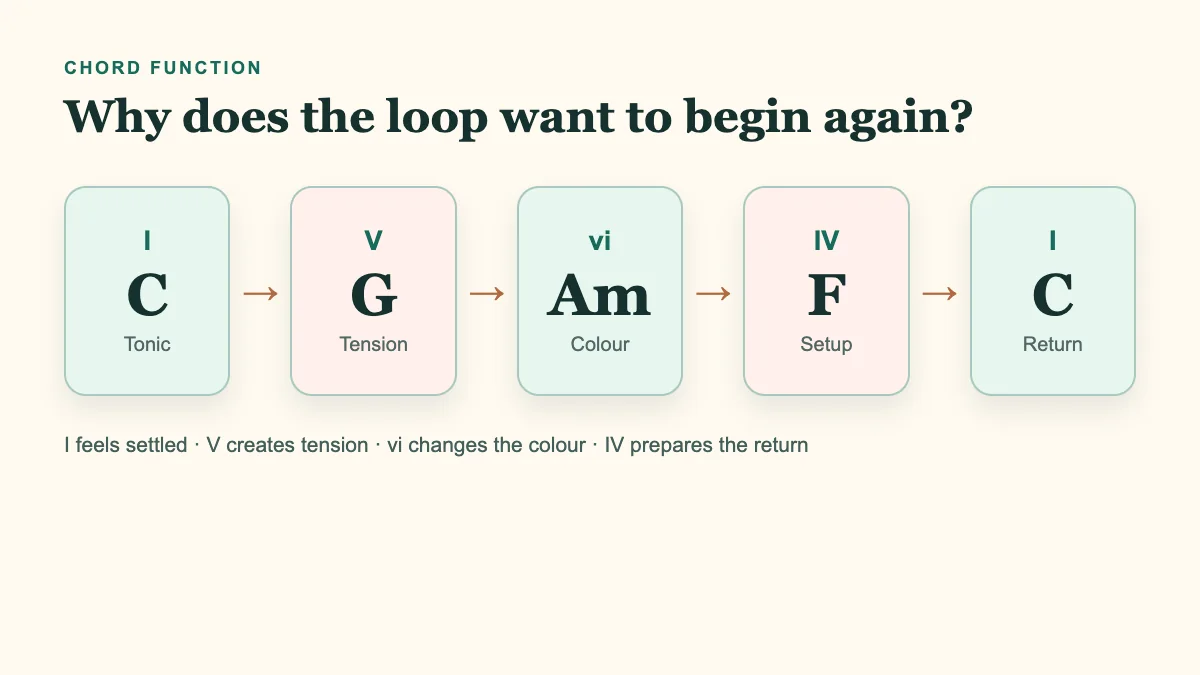
Roman numerals describe a chord’s position and function inside a key rather than one fixed chord name. In C major, C is I, G is V and Am is vi. Move the same pattern to G major and the names become G–D–Em–C, while the pattern remains I–V–vi–IV. This makes it easier to transpose an idea, compare songs and hear harmonic function instead of memorising isolated chord lists.
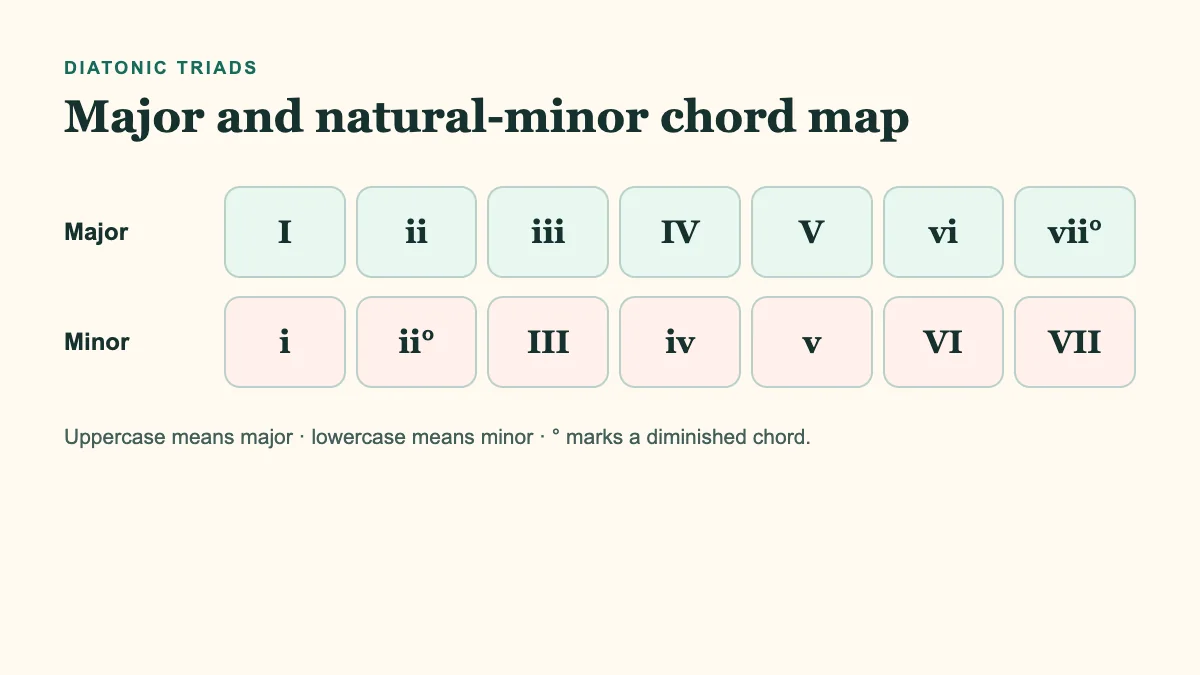
Uppercase numerals represent major triads, lowercase numerals represent minor triads, and the degree sign marks a diminished triad. The diatonic triads in major are I, ii, iii, IV, V, vi and vii°. Natural minor gives i, ii°, III, iv, v, VI and VII. In tonal music, the fifth chord in minor is often changed to major to create a stronger pull home. This tool begins with natural minor because it keeps the first comparison clear and predictable.
How do you choose a progression for a song?
Find where the melody feels settled
If you already have a melody, listen to its ending and longest notes. The pitch that sounds like home can point toward the tonal centre, although it is not an infallible rule. Reduce the possibilities before trying every key. Our guide to identifying a song’s key by ear explains how to combine the resting note, bass movement and cadences.
Choose the kind of harmonic motion you need
| Pattern | What it tends to do | A useful first test |
|---|---|---|
| I–V–vi–IV | Open, circular and easy to remember | A chorus idea over an even four-beat pulse |
| vi–IV–I–V | Begins with minor colour and gradually opens | A more inward verse |
| I–IV–V–I | Clear direction and a firm resolution | Basic harmony and ear practice |
| i–VI–III–VII | Broad, dramatic minor motion | A cinematic or rhythm-led arrangement |
There is no universal best progression. Listen for collisions between the melody and the accented notes in each chord. A chord may belong to the key and still rub against an important melody note. You can replace that chord, change its inversion, shorten it, or treat the melody pitch as a deliberate extension.
How to turn a generated loop into your song
Change chord duration before adding more chords
Four chords held for four equal beats are only a clean first test. Hold the first chord for two bars, shorten the final chord to accelerate the return, or place two changes in one bar. Use the online metronome around 70–90 BPM so you can tell whether the improvement comes from rhythm or harmony.
Use inversions and a purposeful bass line
Keeping every root in the bass can create large jumps. Inversions preserve common tones and allow a smoother top line or bass. In C–G–Am–F, using G/B creates a descending C–B–A bass shape. Hear the plain chords first on the virtual piano, then change just one voicing so the difference remains obvious.
Do not restrict the melody to chord tones
Chord tones are dependable on strong beats, but passing tones, neighbours and suspensions give a melody direction. Begin by finding one pitch shared by two adjacent chords. Approach or leave it by step. A small melodic decision can distinguish two songs that use the same underlying harmony.
Change texture and arrangement
The same progression feels different as block chords, an arpeggio, a muted guitar pattern or a sustained pad. Alter one layer at a time: rhythm on the first pass, density on the second, bass on the third. If you change everything together, you cannot hear which decision improved the idea.
Make the phrase answer itself
Play the loop twice but change the final chord on the second pass. The first ending can remain open while the second resolves firmly. You can also keep the harmony identical and answer the first melodic phrase with a lower or shorter one. Form grows from contrast and return, not simply from using more chord names.
A focused 15-minute workflow
- Minutes 0–3: Choose a key and pattern; play each chord once.
- Minutes 3–6: Sing or play the roots and try to anticipate each change.
- Minutes 6–10: Apply two different rhythms and record short takes.
- Minutes 10–13: Improvise a three- or four-note motif above the loop.
- Minutes 13–15: Keep the strongest pass and note its key, tempo and Roman numerals.
Troubleshooting the tool and the music
- I pressed Play but cannot hear anything.
- Check the tab and device volume. Mobile browsers allow sound only after a direct tap, so press Play again. Some phones also separate silent mode from media volume.
- The loop sounds too familiar.
- Do not immediately add more chords. Change the starting chord, use unequal durations, add one inversion or redesign the melody rhythm. Originality usually comes from the combination of choices rather than one rare chord.
- The melody clashes with one chord.
- Isolate the melody note and chord. If the note is strongly accented, try another chord or voicing. If it is a brief passing note, shorten it or resolve it by step and listen again.
- Which key should I choose?
- For a vocal song, start where the highest and lowest melody notes are comfortable. For an instrumental track, open strings, register and timbre may guide the choice. The transposition guide helps you move the whole idea without changing its relationships.
- Why does the same progression sound different on guitar and piano?
- The harmonic labels stay the same, but register, spacing, open strings, sustain and articulation change the colour. Treat the generated symbols as a map rather than one compulsory voicing.
Frequently asked questions
What is a chord progression?
A chord progression is the order in which chords move through time. Duration, inversion, bass note and rhythm matter as much as the written sequence.
Does the generator choose completely random chords?
No. Character presets use functional patterns, and controlled random stays within the selected major or natural-minor chord family. You should still judge every result with your ears.
Can I use the result in a commercial song?
The tool provides a harmonic starting point. Short chord sequences are widely shared, but melody, lyrics, distinctive rhythm, recording and arrangement can involve separate rights. Review the complete work for originality before commercial release and seek appropriate advice when needed.
Should a beginner use four or eight chords?
Begin with four. Move to eight when you can sing the roots and anticipate the changes. A longer progression is not automatically more musical or advanced.
Can I use seventh chords?
The generator starts with triads so harmonic function remains easy to hear. Once the loop works, try adding a seventh to one chord at a time. Compare the altered version with the plain triad before changing another chord.