How to use the online metronome
Choose a comfortable tempo before you play. Start with a short passage, listen for the accented first beat and place each note evenly between clicks. Raise the tempo only when the passage stays relaxed and accurate.
What does BPM mean?
BPM means beats per minute. At 60 BPM, one beat arrives every second. A higher number makes the pulse faster. The number describes speed; it does not tell you how the beats are grouped.
Use subdivisions without rushing
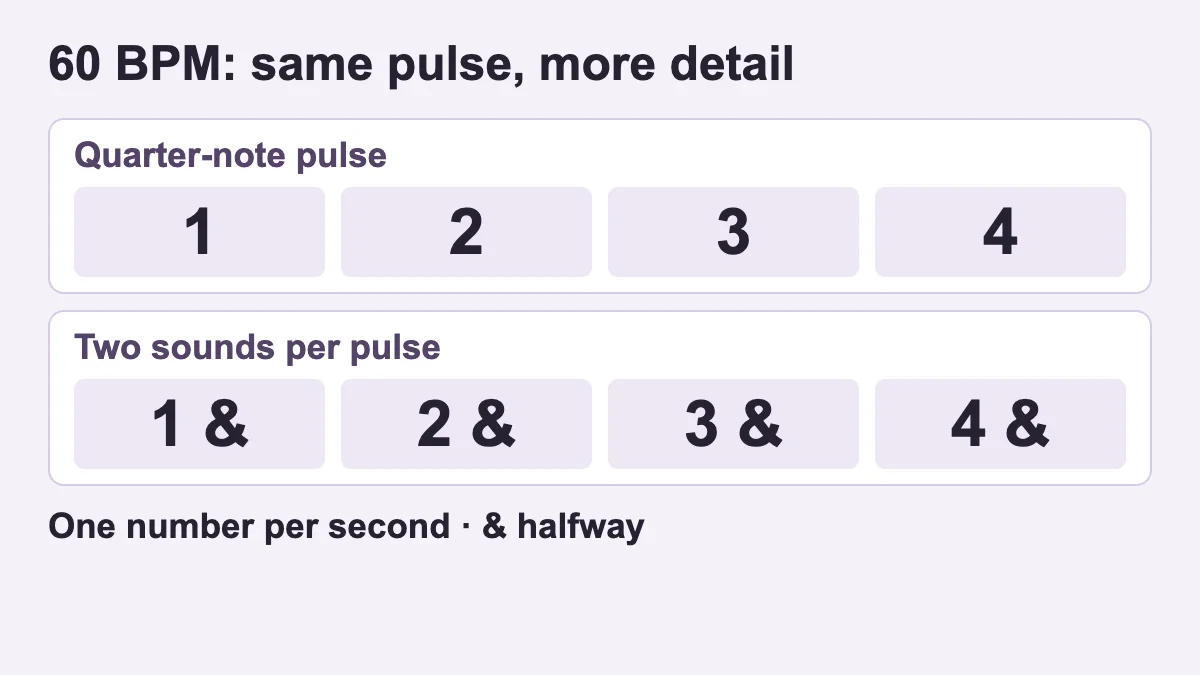
Choose 4/4 at 60 BPM. With two sounds per pulse, count “1 and 2 and 3 and 4 and”; the numbers still arrive once per second. Four sounds per pulse divide each beat into four equal parts. Switch back to one sound and keep those spaces even yourself. The optional count-in gives one complete bar before your practice begins.
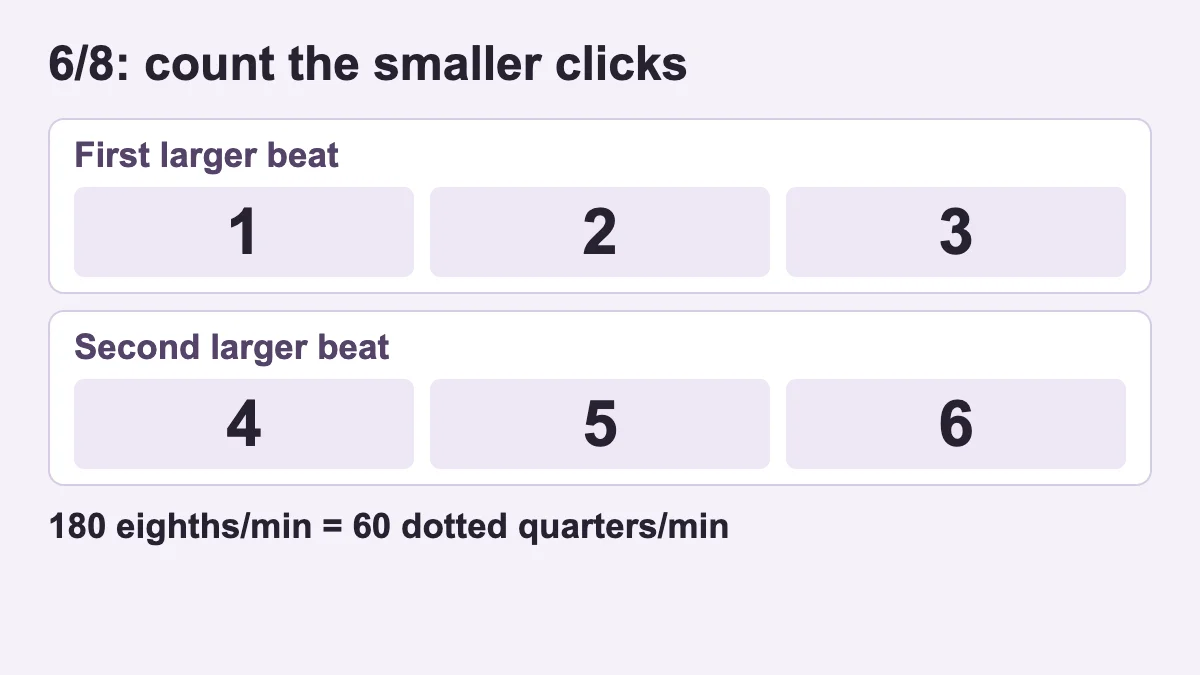
In 6/8 and 7/8 this tool counts individual eighth notes, not dotted-quarter beats. In 6/8, group six clicks as 1-2-3 / 4-5-6. To practise at a dotted-quarter pulse of 60, set this tool to 180 eighth-note clicks per minute. Sound stops when you leave the tab; restart it yourself when you return.
A simple ten-minute practice plan
- Clap or tap with the pulse for one minute.
- Play a difficult two-bar phrase slowly for four minutes.
- Increase by 3–5 BPM only after three clean repeats.
- Finish once without the click and check whether your pulse stayed stable.
For listening practice, try the free ear-training test or virtual piano.
Where should you begin with a metronome?
A metronome is a steady reference, not a machine that forces you to play faster. Begin by choosing a short passage and a tempo at which your movement, breathing and note endings remain controlled. Listen to several clicks before playing. Count the bar, clap the rhythm, and only then add your instrument or voice.
If the written tempo is beyond your present control, lower it. Practising the correct motion slowly is more useful than repeatedly surviving the target speed with uneven timing. Isolate one or two difficult bars. After three relaxed, accurate repetitions, raise the tempo by three to five BPM. Return to the previous setting when tension or rushed notes appear.
BPM and time signature are different
BPM means beats per minute. It describes how often the main pulse occurs. A setting of 60 BPM produces one beat each second. The time signature groups those beats into bars. Music at 100 BPM in 3/4 does not feel organised like music at 100 BPM in 4/4, even though the main pulse has the same speed.
| Control | Meaning | Practice use |
|---|---|---|
| BPM | Beats per minute | Set and measure practice speed |
| Time signature | Grouping of beats | Keep the beginning of each bar clear |
| Downbeat accent | Stronger first beat | Support counting and phrasing |
| Tap tempo | Average interval between taps | Estimate the pulse of music you hear |
How to find a song’s BPM with tap tempo
Tap the button repeatedly with the main pulse you feel. Four or more even taps give a more stable estimate than one or two. If the result appears twice as fast or half as fast as expected, you may be tapping subdivisions or only every second beat. Choose the level that matches how you naturally count the bar.
A performance may speed up, slow down or begin freely. In that case, measure a section with a stable groove and verify the result by running the metronome beside it. Tap tempo is an estimate, not proof that an entire recording stays at one fixed speed.
Metronome practice for different musicians
A reliable tempo-building routine
- Write down the slowest tempo that feels controlled.
- Loop a two-bar section and make three clean repetitions.
- Increase by three BPM and repeat the same check.
- Move back five BPM when timing or movement becomes unstable.
- Finish with a clean repetition instead of a failed attempt at maximum speed.
Progress is not simply the largest number reached. Cleaner attacks, equal note lengths, fewer corrections and less physical tension at the same BPM are meaningful improvements. Sleep, fatigue and a newly changed fingering can alter your daily limit, so compare several sessions rather than judging one attempt.
Common metronome mistakes
Letting the click become background noise
Count before you begin and decide exactly where the first note falls. If you cannot tell whether you are ahead or behind, clap the rhythm without the instrument.
Restarting the whole piece after every error
This over-practises the opening and under-practises the difficult transition. Isolate the error with one note before and after it.
Making large tempo jumps
Ten- or twenty-BPM jumps can hide the point where coordination changes. Small increases reveal the boundary and make progress repeatable.
Replacing musical phrasing with mechanical accents
Use the metronome to organise time, then preserve dynamics and phrase direction. Alternate click and no-click repetitions to test your internal pulse.
A seven-day practice example
| Day | Focus | Task |
|---|---|---|
| 1 | Main pulse | Count and clap between 60 and 80 BPM |
| 2 | Short phrase | Make three clean slow repetitions |
| 3 | Subdivision | Divide every beat into two equal parts |
| 4 | Meter | Compare accented 3/4 and 4/4 bars |
| 5 | Tempo ladder | Increase in three-BPM steps |
| 6 | Internal time | Alternate four bars with and without the click |
| 7 | Review | Record and listen for rushing or dragging |
Online metronome FAQ
What BPM should a beginner use?
There is no universal starting number. Use the slowest tempo at which the task remains meaningful and the motion stays natural. Simple exercises often begin around 50–80 BPM, but a difficult passage may need less.
Why does the click drift away from a song?
The estimate may be wrong, you may be hearing half or double time, or the performance may change tempo. Tap a stable section and compare again.
Does a metronome improve rhythm?
It exposes timing differences, but useful practice also includes counting, clapping, rests, no-click repetitions and applying rhythm in music.
Is this metronome free?
Yes. It works in the browser without an account. It does not use the microphone or upload audio.
Will it keep playing with the screen locked?
Mobile browsers may suspend sound or timers in the background. Keep the tab active for reliable practice.
Practising subdivisions with a metronome
Subdivision means organising the space inside one main beat. Begin with one sound per click, then place two equal sounds inside every beat. Practise four equal sounds only when the main pulse remains clear. The sound selector offers one, two or four sounds per pulse; it does not offer triplets. The BPM does not change when the subdivision changes; the internal spacing becomes more detailed.
Listen for the first note of each group meeting the click. If the notes between clicks are uneven, reduce the tempo. Faster motion and physical tension are not proof of accurate subdivision. Smaller movement, even spacing and a clear downbeat matter more than reaching a large number.
Compare a repetition with and without the click
This metronome does not automatically insert silent bars. Stop after a short passage, repeat it without the click, then start again to re-establish the reference tempo. Restarting creates a new first beat; it cannot tell you whether your silent passage would have landed exactly on a continuous clock. Use this as a listening comparison, not a measured gap-training score.
If you need a continuous timed silent-bar cycle, use a metronome that explicitly supports that feature. Here, a useful simpler task is to keep counting while leaving some notes unplayed, with the click still running. That tests rests without relying on an unavailable automatic mode.
Keeping a useful tempo log
Record the date, passage, starting BPM, number of clean repetitions and reason for difficulty. “Reached 140 BPM” does not show whether attacks were even or movement was relaxed. Compare the highest repeatable, musical tempo across a week rather than celebrating one unstable attempt.
When should you stop using the metronome?
Pause tempo-building while learning an unfamiliar movement, making expressive choices in a free passage, or experiencing pain and excessive tension. A metronome reveals timing; it cannot correct a physical problem. Stop when discomfort appears and seek suitable teaching support.
Transferring metronome work into a real piece
Playing a technical exercise evenly and carrying the same control through a complete piece are different tasks. Isolate the difficult passage first, then add the bar before and after it. Finally restore the longer phrase. If timing changes when the transition returns, the problem may be preparation between sections rather than raw speed.
Do not practise only with a constant click. Alternate one repetition with the metronome and one without, then check again at the same BPM. Rushing in the silent attempt can reveal excitement in easier sections; slowing down may reveal hesitation before a difficult change.
How metronome work connects with rhythm ear training
A metronome supplies an external pulse. Rhythm ear training also involves understanding duration, accent, rests and patterns. Combine click practice with listening, clapping, reproducing and writing short rhythms at different tempos. The web rhythm check offers a starting sample, while KulakApp can support a broader routine.
During weekly review, add “which meter?”, “which subdivision?” and “how many clean repetitions?” beside the BPM number. That turns an isolated speed record into useful musical evidence.
Choose a setup that matches the rhythm you are practising
The practice setup panel changes the metronome controls together so that you can start from a known configuration. It never starts sound by itself. If the click is running, choosing a setup stops it first. Read the displayed settings, then press Start. This is particularly useful on a phone, where changing several small controls one by one can distract from the exercise you meant to practise.
| Setup | Meter and BPM | Sounds per pulse |
|---|---|---|
| Steady pulse | 4/4, 60 | 1 |
| Eighth notes | 4/4, 60 | 2 |
| Three beats | 3/4, 90 | 1 |
| 6/8 | 6/8, 180 eighth-note clicks | 1 |
All four setups enable the first-beat accent and leave the count-in off. You can change those choices afterwards. They are example starting points, not prescribed speeds for every beginner, piece or instrument. If the task is too difficult at the suggested setting, reduce the BPM. The aim is to make the controls understandable enough that you can select your own appropriate settings.
Steady pulse: hear the spaces before adding more notes
Select Steady pulse, then Start. At 60 quarter-note beats per minute in 4/4, the four numbered beats occupy four seconds. Count “one, two, three, four” across those clicks without inserting extra numbers between them. After two bars, clap once on each click. If you lose the count, listen for the stronger first click and begin another complete bar rather than trying to repair the count halfway through.
Next, clap only on beats one and three while continuing to count all four beats. The silent actions on two and four still occupy time. You have changed your rhythm, not the metronome tempo. Finally, return to clapping all four clicks. That simple alternation reveals whether you are keeping the pulse through the spaces or waiting for each sound to tell you what to do.
Eighth notes: keep the numbers in the same place
Stop and choose Eighth notes. The BPM remains 60, but there are now two sounds inside each quarter-note beat. Count “one and two and three and four and.” The numbers belong to the main beats and the word “and” belongs halfway between them. Clap on the numbers for one bar, then on both the numbers and the “ands” for another. The metronome has not sped up between those bars.
A useful diagnostic is to speak the complete count while clapping only on the “ands.” Do this briefly and return to the main beats. If your spoken numbers start following your claps instead of the original pulse, slow down and rebuild the basic alignment. This is an exercise in placement, not a challenge to make the most complicated rhythm possible. The quarter, eighth and sixteenth note guide explains the written duration relationships.
Three beats: hear a bar without squeezing in a fourth beat
The Three beats setup uses 3/4 at 90 BPM. Count “one, two, three” and return immediately to one. Each quarter-note beat lasts two-thirds of a second, and the whole bar lasts two seconds. Compare that with 4/4 at the same BPM: the individual beats have the same duration, but a bar has four of them instead of three. A longer bar is not automatically a slower pulse.
Clap the first beat and lightly tap the next two. Repeat four bars, then stop. If you pause after the third beat, you have added time that the bar does not contain. Listen through a few bars before trying again. You do not need to exaggerate every downbeat in a real performance; the accent here simply makes the grouping easy to locate while learning.
Read the beat unit before comparing two BPM numbers
This tool counts individual eighth notes in its 6/8 and 7/8 settings. In 6/8, 180 on the display means 180 eighth-note clicks per minute, not 180 dotted-quarter beats. Three eighth notes make one dotted quarter, so that setting corresponds to 60 dotted-quarter beats per minute. A teacher, score or another metronome may use the dotted quarter as the displayed pulse. Compare the units before comparing the numbers.
For the 6/8 setup, count the six clicks as “one two three, four five six,” feeling two larger groups. The built-in accent marks the beginning of the bar; it does not independently accent the fourth click. Supply that second group gently in your counting. This also explains why selecting 6/8 does not turn the tool into a swing or triplet-accent generator. Its controls have a specific, visible behaviour.
| Displayed eighth-note BPM | Dotted-quarter BPM | Seconds per bar |
|---|---|---|
| 120 | 40 | 3 |
| 150 | 50 | 2.4 |
| 180 | 60 | 2 |
| 210 | 70 | About 1.71 |
The available range is 40–220 displayed BPM. For a compound-meter exercise requiring an eighth-note click above that range, this particular setting cannot provide it. Do not disguise the limit by giving the user a different beat unit without explanation. You can instead count two larger pulses with a suitable simple-meter setup, understanding that its accent grouping represents your practice pulse rather than the full written 6/8 notation.
Find out whether a tap-tempo reading is half or double time
Imagine tapping once every half-second. The estimate is approximately 120 taps per minute. If you tap only every second pulse of the same music, your taps are one second apart and the estimate is approximately 60. Both can arise from a steady performance. The question is which level matches the beat unit you want to practise. The tap button cannot infer that musical choice from timing alone.
Count a short section before tapping. Then use the same level consistently for several taps: do not begin with quarter notes and finish with eighth notes. After tapping, inspect the number and press Start if the click is stopped. If the click was already running, tap tempo adjusts its speed. Let it run for several bars while comparing with the music. A mismatch that grows steadily suggests a tempo difference; a mismatch that changes around a phrase may reflect timing variation in the performance.
Long pauses reset the useful tapping history as older taps fall out of the tool's short averaging window. For a new estimate, pause, find the intended pulse again and tap evenly. Avoid claiming precision from a single hurried tap. The tool is a convenient tempo estimate, not automatic audio analysis: it does not listen through your microphone or inspect a recording uploaded from your device.
Work through a rhythm with rests instead of skipping the silence
Set 4/4 at 60 BPM with two sounds per pulse. Count all eight positions in a bar. Clap on beat one, on the “and” after two, and on beat four. Leave the other positions unclapped. That gives you three attacks in a bar which still occupies four quarter-note beats. Repeat the pattern twice, then clap every main beat for one bar to check that the reference pulse has not moved.
If the “and” after two keeps arriving on beat three, speak “two and three” while pointing to the middle position. If your final clap arrives early, keep saying the silent third beat before reaching four. Resolve the specific misplaced attack instead of repeating the whole exercise faster. The virtual drum kit and short beat builder can make the placement visible, but it is a separate tool rather than a synchronised accompaniment to this metronome.
You can perform the same pattern on one piano note or one comfortable syllable. Keeping pitch constant removes one source of difficulty. Once the rhythm is clear, add two pitches and observe whether a change of key or syllable introduces hesitation. Separating the tasks in this order makes it easier to tell whether you are correcting rhythmic placement, pitch selection or coordination.
Check timing without pretending the browser is grading you
The visible beat indicator helps you find the count, but the sound is your timing reference. Browser rendering can be delayed by a busy device even when sounds are scheduled with the audio clock. Do not use a moving dot as a laboratory measurement of your physical reaction time. This page does not record your playing, compare it automatically with the click or assign an accuracy percentage.
For a simple self-check, choose two bars and decide one question before starting. Perhaps the last note keeps landing early, or a rest disappears when you change chord. Listen for that event over a few attempts. If you use a separate recorder, follow that recorder's permission and privacy settings; no microphone permission is requested by this metronome. Be cautious about comparing a Bluetooth sound delay with the timing of a physical tap.
The same distinction applies to progress. Completing a passage at a higher BPM is not automatically an improvement if you omit rests or change the rhythm. Record the beat unit, meter, subdivision and passage alongside the number. A note such as “4/4, quarter = 72, two bars, ending on time three times” says more than “72 achieved.” It also lets you reproduce the task next session.
Use the metronome alongside the other free instruments
Establish a pulse here, stop it and try a brief idea on the virtual piano or virtual melodica. Returning to this page gives you a way to check the pace again. Sound stops when you leave the metronome tab; it is not designed to run hidden behind another browser instrument. If simultaneous practice is essential, use a separate physical click source or a tool explicitly designed for that workflow.
The rhythm worksheets help when the main problem is interpreting durations. The rhythm ear-training guide is a better next step when you can read a pattern but struggle to remember one you hear. Use the metronome for the pulse, a focused exercise for the specific difficulty and KulakApp for a broader regular listening routine. No single control replaces all three jobs.